The Windows 10 VPN Client and IPv4 Settings

As soon as Windows 10 RTM was released, a large number of people at my company were asking to be upgraded. Unfortunately, we did not have time to troubleshoot all the potential issues we might encounter. One thing we discovered still lingering from the last preview build was that you cannot edit the IPv4 settings inside of a vpn profile.

We usually un-check the box under advanced IPv4 properties labeled “Use default gateway on remote network” so that employees can funnel internet access through their local gateway while connected to the company vpn. Hopefully, this will be resolved in a coming update or service pack.

In the meantime, we’re setting up vpn connections using Powershell. Here’s my script to add a vpn profile using MSCHAPv2 for authentication, SSTP as the vpn connection type, and enabling split tunneling (same as un-checking the default gateway box):

In PowerShell —

Add-VPNConnection -Name vpn connection name -ServerAddress vpn servername  -TunnelType SSTP -EncryptionLevel Optional -AuthenticationMethod MSChapv2 -SplitTunneling -AllUserConnection -UseWinLgonCredential -PassThru

There are many other vpn client cmdlets available to customize your connection. Visit: https://technet.microsoft.com/en-us/library/jj554820(v=wps.630).aspx to view a complete list.
Mac OSX Yosemite and .local domain names

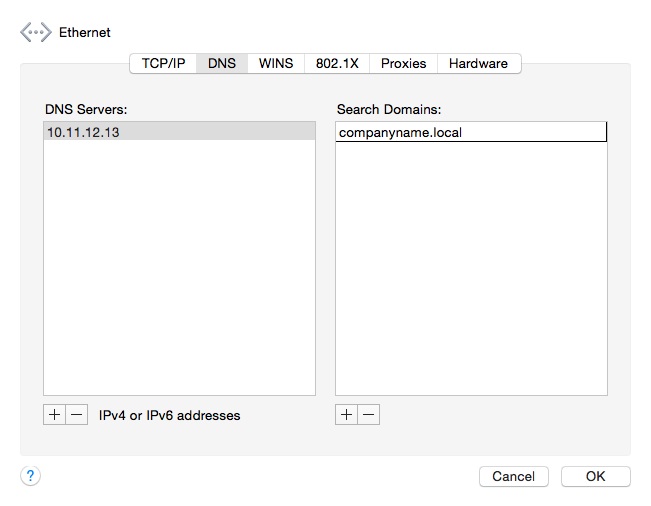
After the release of Yosemite, Mac users in my company who updated to the new OS, noticed that they were unable to resolve .local domain names. This was especially an issue for those connecting over a VPN connection. For the Mac users on our domain, I always included the IP addresses of our DNS servers in their Advanced network settings. However to resolve the issue with name resolution, I now have to also add the name of the .local domain in the Search Domain box (as seen below).

Enter the name of your .local domain in each internet connection setting (ethernet, wifi,etc.) and any VPN connections you may also have setup. After applying the new entry, you will need to disconnect and re-connect to your internet and VPN connections. After reconnecting you should be able to resolve .local addresses.

SearchDomain2

MySQL Error – “The partition with /var/lib/mysql is too full”

Have you encountered this error when trying to start MySQL on your Linux server? Turns out all you need to do is sudo.

Initially, I used this to start MySQL server: /etc/init.d/mysql  start

I encountered the error: “The partition with /var/lib/mysql is too full”

Then I put sudo in from of my statement : sudo /etc/init.d/mysql start

MySQL starts successfully.

Free Cisco WebEx Account

Cisco is currently offering a free WebEx Basic account. This free account will allow you to conduct online meetings with up to three other attendees. It includes basic tools such as sharing files, whiteboards, etc. You can access your meetings on your laptop, iPhone, and iPad. You will also have to ability to record your meetings and share it with others. Go here to sign up for your free account on the Cisco website: https://signup.webex.com/webexmeetings/US/display_acquisition.html?TrackID=1031278&displayID=IDGCSMB&country=US


Avaya VoIP phones and call forwarding

I am a VoIP newbie. So everyday I learn something new. Recently, a few or our employees asked how to increase the number of rings when forwarding their calls to cell phones. As it was setup originally, the call rings once at the desk phone, then forward to the cell phone where it rings twice, and if not answered goes directly to voice mail. I thought this might be a settings that could be changed at the phone phone level. However, this is not the case. You have to make the change in the Avaya Site Administration console.

Log in to your Avaya Site Administration console

Under the Advanced options, select Start Emulation

At the Command prompt, enter – change system coverage

The second line labeled ‘Off-Net Cvg Subsequent Redirection…’ is where you make the change 

Increase the number of rings 

Click Enter at the top to save your changes

You’re ready to test call forwarding and verify that the number of rings has increased.