
*This is a quick how-to for installing Nginx. If you need more insight into launching Amazon instances, please visit the Amazon documentation page: https://docs.aws.amazon.com/AWSEC2/latest/UserGuide/concepts.html.
First, login into your Amazon Linux 2 instance. Amazon maintains its’ own repository (amazon-linx-extras) of software packages for quick convenient installation on it’s instances.
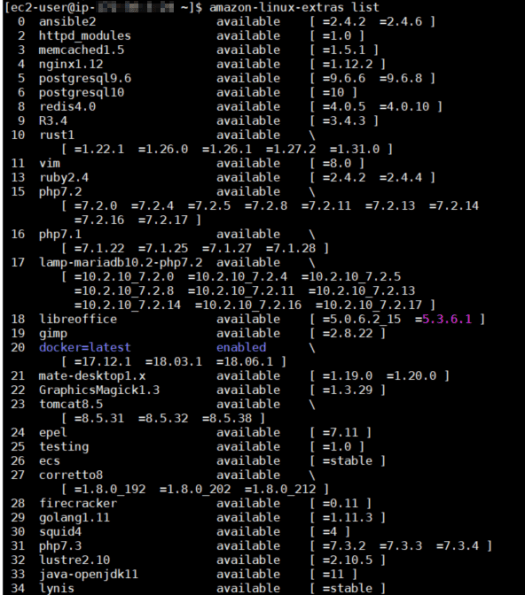
To view what is available in the repo enter amazon-linux-extras list in the terminal window.
As you can see, there are a number of commonly used software packages available and nginx1.12 is fourth on the list.
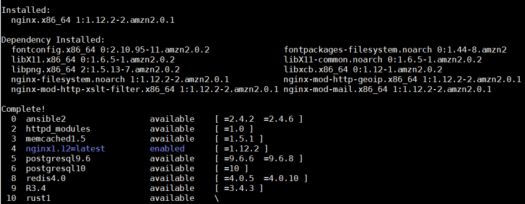
Next, we’ll run: sudo amazon-linux-extras install nginx1.12 (you must use the version number otherwise the install will fail). Once installed, you will see a screen similar to the one below. Nginx is now enabled in the repo and installed on my instance.
Now, we’ll verify the installation. At the prompt run: nginx –v and you’ll see that the server is now running version 1.12.2:

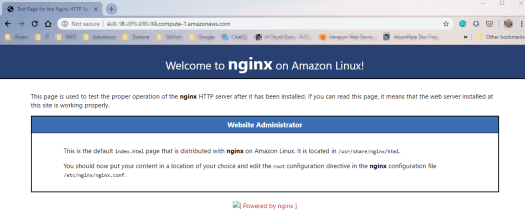
We can also browse to the default web page by using public DNS name:
 d:constructed
You must be logged in to post a comment.